Hacking the New York City Building Permit Portal
While trying to find out if a music venue would reopen, I discovered a vulnerability that exposed restricted documents for every building in New York City.
Update — April 15, 2026: The City of New York has confirmed the vulnerability described in this post has been fully resolved. I am now listed on their page of responsible security researchers. This post has been updated to include the full technical details of the exploit.
Earlier this year I went down a bit of a rabbit hole.
It started with a music venue.
The Situation
A major electronic music venue in Brooklyn had been undergoing renovations and inspections for months. There were rumors circulating about delayed approvals, failed inspections, and uncertainty about reopening.
At the time, there was a lot of speculation about whether the venue would pass its inspections and reopen on schedule. I got curious about how the inspection process worked and started exploring the city's public building permit portal — DOB NOW.
These portals exist to provide transparency into construction activity. You can typically see things like:
- permit filings
- inspection results
- contractor information
- approval history
But they also host a large number of documents associated with each job filing.
Discovering the Access Issue
While browsing through a few filings, I noticed something odd.
Some documents were clearly intended to be public and downloadable. Others appeared in the interface but displayed an "unauthorized" message unless you were a stakeholder on the project.
Naturally, I assumed those documents were protected properly.
But while inspecting how the portal handled document downloads, I discovered that the backend wasn't consistently enforcing the same permissions that the interface was displaying.
In other words:
The UI said "you can't access this document", but the server would still return it under certain conditions.
Once I realized this, it became clear that the problem was much larger than a single project.
Testing the Scope
To confirm whether this was isolated or systemic, I tested the same behavior on a few other filings.
It worked.
Then I tried different buildings.
It still worked.
Eventually it became clear that the issue potentially affected documents across the entire system — including architectural plans, sketches, and internal filing documents for buildings all over the city.
Video Walkthrough
The Technical Details
Now that the vulnerability has been patched, I can walk through exactly how it worked.
Step 1: Finding the Documents
Working with a specific BIN (Building Identification Number), I logged into DOB NOW Build with a regular user account — nothing special, just a new account I had created.
After navigating to the dashboard and searching for the BIN, I opened one of the job filings. Under the Documents tab, two documents were listed: a DPL document (which I was authorized to view) and a Plan/Sketch document (which I was not).
Clicking the Plan/Sketch returned "Not Authorized." Clicking the DPL document worked fine.
Step 2: Intercepting the Request
With the browser's network inspector open, I observed the requests being made when loading the documents tab.
The first important request was to the required documents list endpoint. This returned metadata for every document associated with the filing — including the internal document URL for each one, regardless of whether you were authorized to view it.
So even though the UI blocked me from downloading the Plan/Sketch, the API had already handed me its internal server URL in the document metadata response.
Step 3: Replaying the Download Request
When I clicked the DPL document (the one I could access), the portal made a POST request to a download endpoint. The request body contained the internal document URL, and the headers included my user ID and auth token.
I copied this request into Postman:
- URL: the download endpoint
- Body: the JSON payload from the DPL download request
- Headers:
system-user(my user ID) andauth-token
Hitting send returned the DPL document successfully — the same document I had just viewed through the portal.
Step 4: Swapping the Document URL
Here's the vulnerability.
I went back to the required documents list response and grabbed the internal document URL for the Plan/Sketch — the document I was explicitly told I couldn't access.
I swapped this URL into the request body, replacing the DPL document URL.
I hit send.
It returned the Plan/Sketch.
The download endpoint performed no authorization check on which document was being requested. It only verified that you were an authenticated user — not that you had permission to access that specific document. Any authenticated user could download any document in the system by substituting the document URL parameter.
The Root Cause
This is a classic Insecure Direct Object Reference (IDOR) vulnerability.
The document list API leaked internal document references to all users, and the download API trusted whatever document reference it received without verifying per-document access control.
The authorization check only existed in the frontend. The UI correctly displayed "Not Authorized" and prevented the click action. But the backend endpoint that actually served the file had no such check. It was a textbook case of client-side-only access control.
Responsible Disclosure
Instead of digging deeper, I documented the issue and reported it through the city's Vulnerability Disclosure Program.
My report included:
- a clear explanation of the authorization issue
- steps to reproduce the problem
- examples of documents that could be accessed unintentionally
- recommendations for fixing the backend permission checks
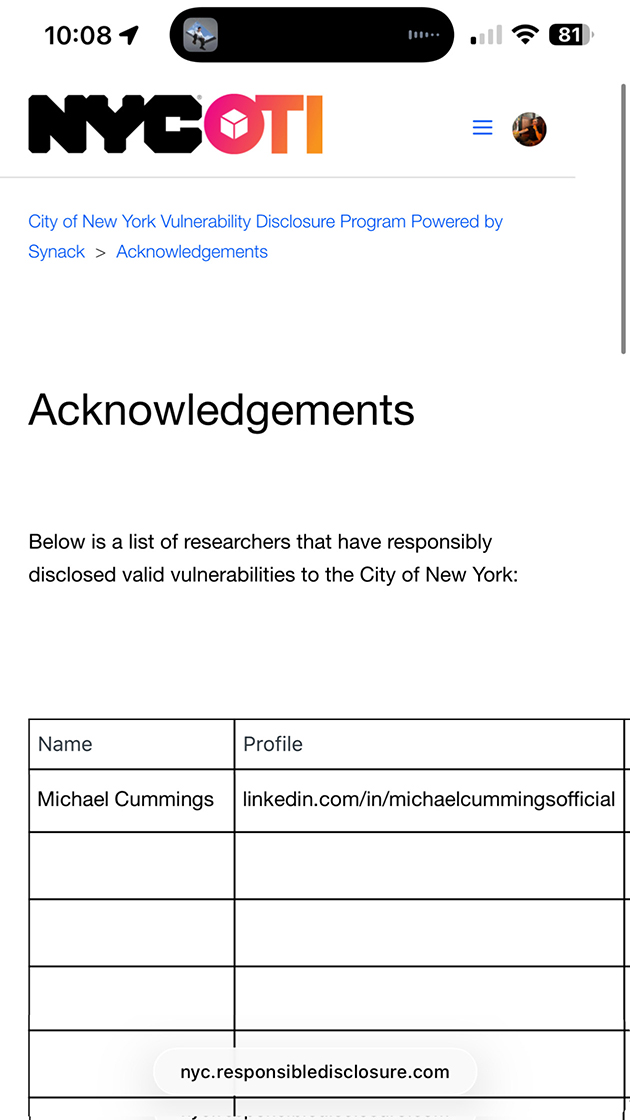
The City of New York resolved the vulnerability on April 15, 2026. I am now listed on the city's Acknowledgements page as a responsible security researcher.
Why This Matters
Municipal permitting systems sit at an interesting intersection of public transparency and sensitive infrastructure.
Some information should absolutely be public.
But detailed construction documents can include things like:
- full architectural plans
- structural layouts
- building systems diagrams
- engineering calculations
When access controls are implemented only on the client side, systems like this can unintentionally expose far more information than intended. In this case, it potentially affected documents for buildings across the entire city.
The Original Motivation
Ironically, this entire investigation started because I just wanted to answer one simple question:
Would the venue pass inspection and reopen?
What began as curiosity about a nightclub renovation ended up uncovering a much larger issue in the city's permitting software.
I just wanted to see Disco Lines... RIP Brooklyn Mirage.
Enjoyed this post?
Subscribe to the newsletter and get new posts in your inbox.